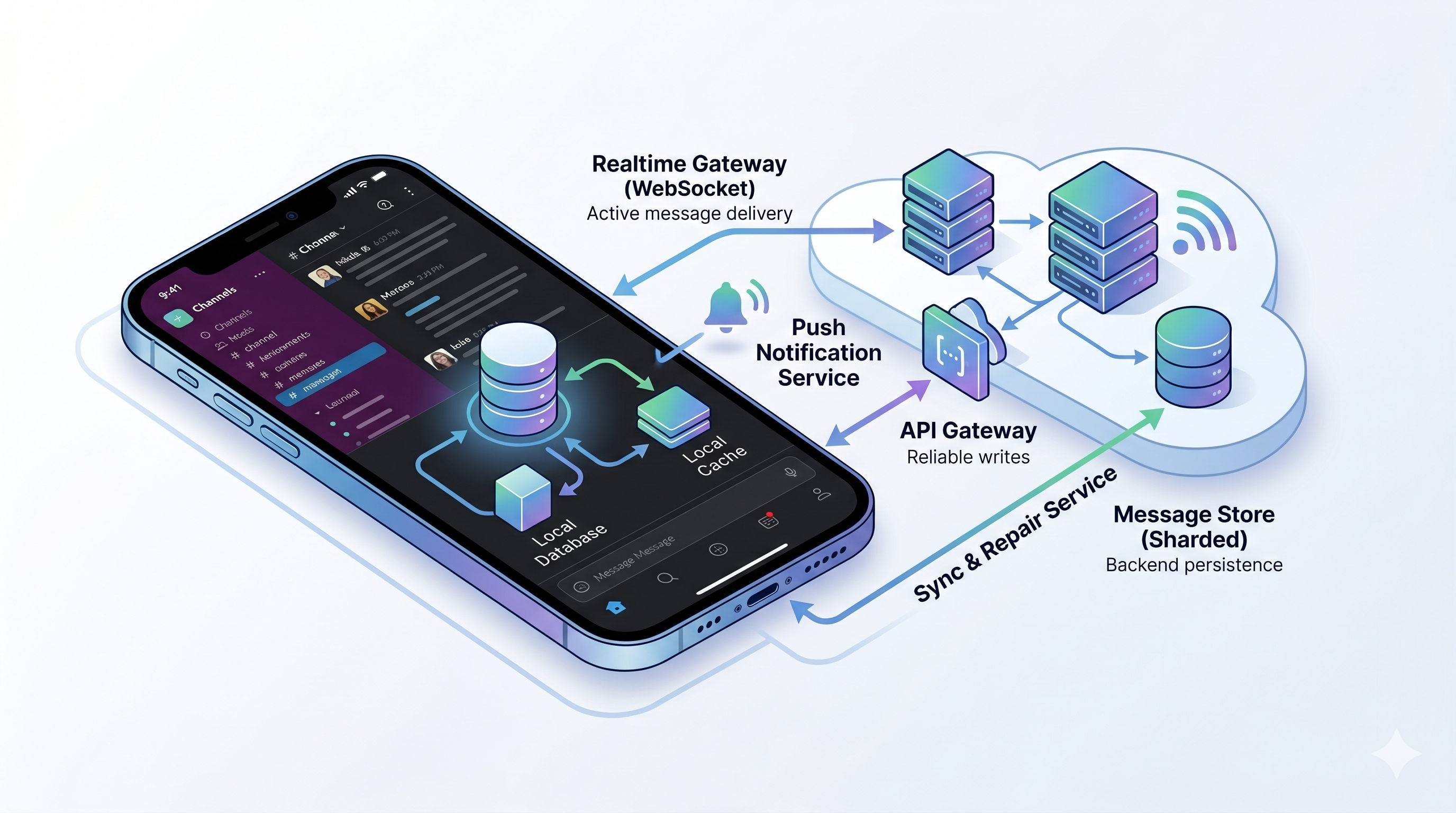
Design Slack for mobile engineers
When I think about designing Slack, the conversation can turn into a backend architecture exercise pretty quickly.
That is not wrong. Slack needs durable message storage, realtime fanout, search, file uploads, notification pipelines, queues, caches, and a lot of operational discipline.
But if we stop there, we miss the part that users actually feel on their phone.
The mobile app is not a thin wrapper around a message API. It is an intermittently connected cache with a local database, pending mutations, background limits, push notifications, unread state, battery constraints, and old app versions that still need to work.
So I want to design Slack from that angle.
The backend still matters. A lot. But I am going to start with product behavior, then work backward into the architecture.
Want to test the ideas first or come back later? Try the Slack mobile design quiz. It covers the core concepts from this post: local state, sync cursors, push notifications, idempotency, read state, attachments, search, and scaling tradeoffs.
This post is part of my System design for mobile engineers series.
Problem statement
Design a Slack-like messaging system for workspaces, channels, DMs, threads, files, search, realtime updates, notifications, and mobile clients.
The system should support:
- multiple workspaces
- public channels, private channels, DMs, and group DMs
- sending, editing, deleting, and reading messages
- threads and reactions
- file attachments
- realtime delivery while the app is active
- push notifications when the app is backgrounded
- unread counts and read state across devices
- search across accessible messages
- offline read and offline send on mobile
The mobile-specific goal is this:
The app should feel fast and reliable even when the network is not.
That means we need local state, optimistic UI, durable retries, and a sync protocol that can recover from missed events.
Requirements
Functional requirements
For this version, I would scope the product like this:
- Users can belong to many workspaces.
- Workspaces contain channels, DMs, and group DMs.
- Users can send text messages.
- Messages can have reactions, thread replies, edits, deletes, and attachments.
- Users can scroll history with pagination.
- Active clients receive new messages in realtime.
- Inactive mobile clients receive push notifications for DMs, mentions, keywords, and configured channels.
- Users can mark conversations as read.
- Read state syncs across mobile, web, and desktop.
- Users can search messages they are allowed to access.
I would explicitly defer voice huddles, enterprise legal hold, workflow automation, shared channels across organizations, and advanced admin controls unless I wanted to go deeper later.
Non-functional requirements
The important non-functional requirements are:
- Low latency for sending and receiving messages.
- Durable message writes.
- At-least-once event delivery with client-side deduping.
- Fast cold start on mobile.
- Offline read for recently opened conversations.
- Offline send with retry and idempotency.
- Correct unread counts after reconnect.
- Permission-aware search.
- Graceful degradation when search, push, or file processing is delayed.
The key phrase is “graceful degradation.” Messaging systems rarely fail as one big outage. They fail as drift: missed events, stale badges, duplicate sends, delayed pushes, broken search indexing, or files stuck in upload limbo.
Scale assumptions
I would pick reasonable round numbers and treat them as assumptions, not facts:
- 10 million daily active users.
- 1 million active workspaces.
- 100 million messages per day.
- 10 billion stored messages.
- 1 billion realtime events per day, including messages, reactions, edits, deletes, typing, presence, and read updates.
- 500 million push notification candidates per day before filtering preferences.
- Large enterprise workspaces with very hot channels.
Those numbers are enough to justify sharding, queues, caches, and async indexing. They are also enough to justify mobile-specific prioritization. A phone should not try to sync an entire workspace at startup just because the backend can theoretically serve it.
Product behavior before architecture
Before drawing services, I want to define the user-visible behavior.
When the app opens
The app should render something useful immediately from local storage:
- workspace list
- channel list
- recent DMs
- cached messages for recently opened conversations
- last known unread counts
- pending outgoing messages
Then it should sync in priority order:
- current workspace metadata
- current conversation
- mentions and DMs
- unread channels
- read state and badge corrections
- older history and less active channels
The app should not block startup on a full workspace sync.
When the user sends a message
The message should appear immediately as pending.
The app should persist a local mutation before making the network call. If the process dies, the send should still be retried later.
The server should accept an idempotency key so retries do not create duplicate messages.
When the user receives a message
If the app is foregrounded, a WebSocket event should update the local database and the UI should react from local state.
If the app is backgrounded, push should notify the user or wake the app if the OS allows it. But push is not the source of truth. When the app opens, it should use sync to fetch authoritative state.
When the user switches devices
Read state should converge. If I read a channel on desktop, my phone badge should eventually clear. If my phone was offline, it should correct itself the next time it syncs.
When the network is bad
The app should keep working for recent data:
- cached channels remain readable
- pending sends stay visible
- retries happen with backoff
- upload progress survives process death where possible
- stale badges are corrected after sync
That product behavior drives the architecture.
API contract
I would keep the API surface small at first, then add details as needed.
Send a message
POST /v1/workspaces/{workspace_id}/conversations/{conversation_id}/messages
Idempotency-Key: {device_id}:{local_operation_id}
Response:
The idempotency key is the important part. If the client retries after a timeout, the server should return the same result for the same operation.
Sync after a cursor
GET /v1/workspaces/{workspace_id}/sync?cursor={cursor}&limit=500Response:
If the cursor is too old, the server can return a gap response:
That lets the client repair state without deleting its whole local database.
Fetch conversation history
GET /v1/conversations/{conversation_id}/history?before={message_id}&limit=50This is used for initial loads, scrollback, and gap repair. Slack’s public conversations.history API has similar ideas: cursor pagination and time-window fetching.
Mark read
POST /v1/conversations/{conversation_id}/read-state{
"last_read_message_id": "msg_123"
}The server should treat this as a monotonic high-watermark for that user and conversation. A stale device should not move the read cursor backward.
Upload a file
POST /v1/files/upload-sessionResponse:
{
  "file_id": "file_123",
  "upload_url": "https://object-storage.example/upload/...",
  "expires_at": "2026-05-24T18:00:00Z"
}
The client uploads bytes directly to object storage, then calls:
POST /v1/files/{file_id}/completeThis avoids proxying large file bytes through the message service.
Data model
At a high level:
Workspace(id, name, cell_id)
User(id, name)
WorkspaceMember(workspace_id, user_id, role)
Conversation(id, workspace_id, type, name, created_at)
ConversationMember(conversation_id, user_id, notification_level)
Message(id, workspace_id, conversation_id, sender_id, text, created_at, edited_at, deleted_at, thread_id, server_sequence, client_message_id)
Reaction(message_id, user_id, emoji, created_at)
File(id, workspace_id, owner_id, object_key, status, mime_type, size_bytes)
MessageFile(message_id, file_id)
ReadState(user_id, conversation_id, last_read_message_id, updated_at)
Event(id, workspace_id, conversation_id, server_sequence, type, payload, created_at)
IdempotencyRecord(user_id, workspace_id, key, request_hash, response_body, expires_at)
For storage, I would optimize the message table around the access pattern:
- fetch recent messages in a conversation
- paginate older messages
- append new messages
- fetch by message id
- filter by workspace and permissions
A common primary index would be something like:
(conversation_id, created_at, message_id)At larger scale, conversations or workspaces can be partitioned across shards. Slack has written about scaling datastores with Vitess and about moving toward cellular architecture. I would not claim to recreate Slack’s exact system, but I would borrow the principle: isolate large groups of tenants into cells so one hot customer or failure domain does not affect everyone.
High-level architecture
The system has a few major paths: message writes, realtime delivery, sync repair, push notifications, search indexing, and file upload processing.
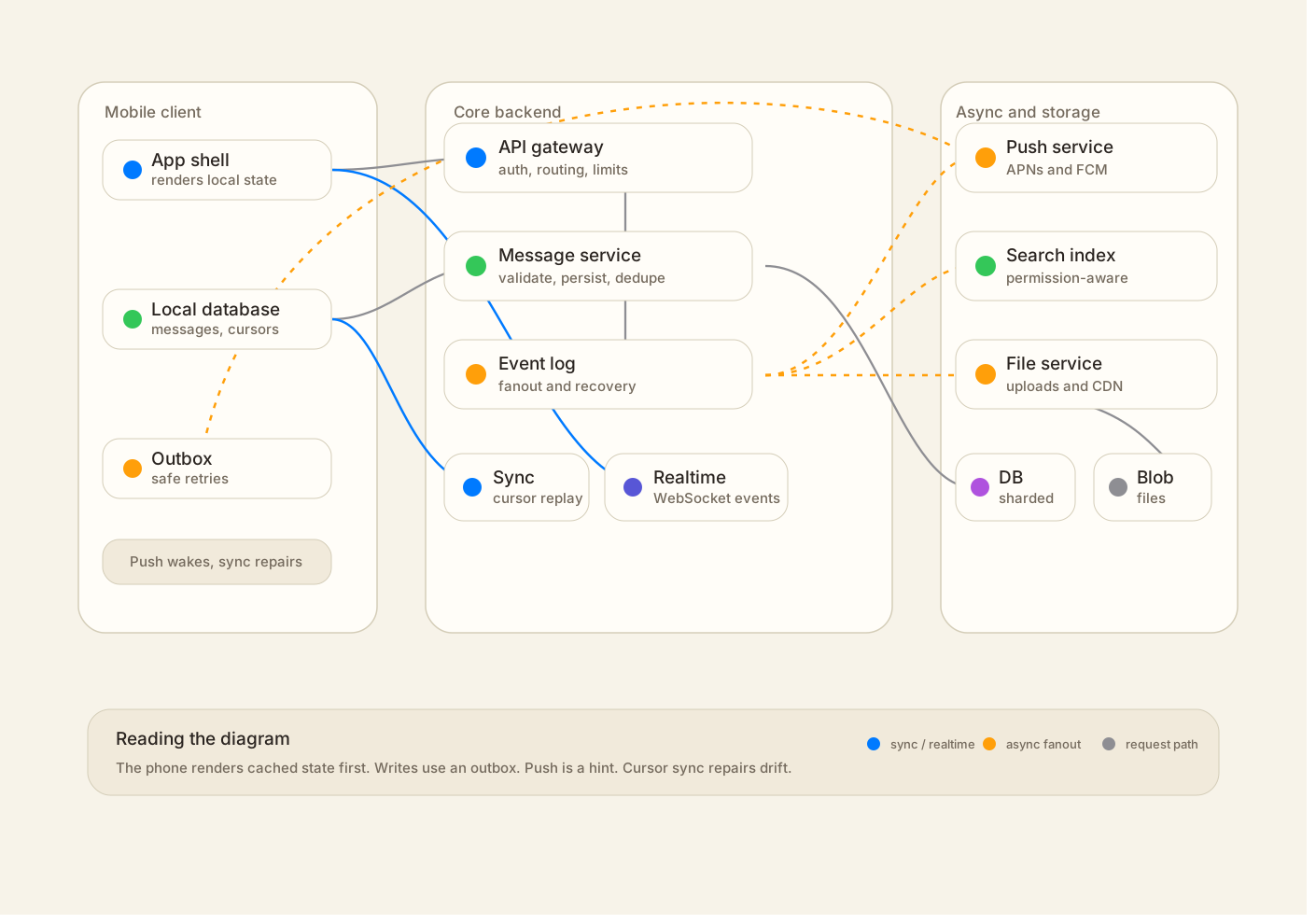
The important separation is this:
- Message writes are durable and synchronous.
- Realtime delivery is fast but recoverable.
- Push is useful but not authoritative.
- Search and file processing are async.
- Mobile clients render from local storage and reconcile through sync.
Deep dive: sending a message from mobile
The send flow is where mobile system design becomes real.
The happy path:
- User taps send.
- Client creates a local message with
local_message_idand statuspending. - Client writes a
pending_mutationrow to the local database. - UI renders the message immediately from local storage.
- Network worker sends
POST /messageswith an idempotency key. - Server validates membership and permissions.
- Server checks the idempotency key.
- Server writes the canonical message to the message store.
- Server appends a
message.createdevent to the event log. - Server returns the canonical message.
- Client replaces the pending message with the canonical one.
- Realtime gateway fans out the event to online recipients.
- Async jobs handle push notification candidates, search indexing, analytics, and attachments.
The local tables on mobile might look like this:
messages
  local_id
  server_id
  conversation_id
  sender_id
  text
  status: pending | sent | failed
  created_at_local
  created_at_server

pending_mutations
  operation_id
  type: send_message
  idempotency_key
  payload
  retry_count
  next_retry_at
  status
This solves a few real problems:
- If the app is killed after the user taps send, the message is not lost.
- If the request times out after the server committed the message, retry does not duplicate it.
- If the WebSocket echo arrives before the HTTP response, the client can dedupe using
client_message_idor canonical message id. - If the user is offline, the message can stay pending and retry later.
For retries, I would use exponential backoff with jitter. On Android, durable retry can run through WorkManager. On iOS, background execution is more constrained, so I would rely on foreground retry, opportunistic background tasks, and push or app open as sync triggers. The product should be honest about state: pending, failed, tap to retry.
Deep dive: receiving messages
There are three receive paths:
- Foreground realtime events.
- Push notifications.
- Cursor-based sync.
Foreground
When the app is active, it keeps a WebSocket connection to a realtime gateway. The gateway authenticates the user, subscribes the connection to allowed conversations, and sends events.
Events should be idempotent:
The client stores the event id or server sequence so duplicate events are harmless.
Background
When the app is backgrounded, the WebSocket cannot be treated as reliable. iOS and Android both restrict background execution. Android Doze can delay network work. iOS may not run the app until the user opens it or taps a notification.
So push should be treated as a hint:
The push payload should carry identifiers that help the app navigate and sync. It should not be treated as the full message history.
Reconnect
When the app reconnects, it calls sync with its last cursor.
If the server still has all events after that cursor, it returns them. If not, it tells the client to repair specific conversations by fetching recent history.
That means realtime delivery can be at-least-once rather than exactly-once. Exactly-once delivery across mobile networks, process death, WebSocket reconnects, and multiple devices is not a realistic requirement. The system should use durable state, idempotent events, and repair.
Deep dive: local database and sync priority
A Slack-like mobile app should render from a local database, not directly from network responses.
The UI observes local data. Sync writes to local data. This gives you fast startup, offline reads, and a single place to reconcile network state.
A reasonable mobile schema includes:
workspaces
channels
channel_memberships
users
messages
threads
reactions
files
read_state
sync_cursors
pending_mutations
notification_state
The hard part is sync priority.
On cold start, the app should not fetch everything. It should prioritize:
- current conversation
- DMs and mentions
- unread channels
- workspace and channel metadata
- read state corrections
- older history
- archived channels and rarely opened threads
This is where mobile differs from a backend-only design. The backend may be able to serve a lot of data, but the phone has storage, battery, startup time, and network constraints.
Deep dive: read state and badges
Read state looks simple until you use multiple devices.
Suppose I read a channel on desktop while my phone is offline. My phone still has an unread badge. Later, a push notification arrives late. Then I open the app.
The correct behavior is not to trust the badge or the push. The app should sync read state and message events from the server, then recompute local unread counts.
I would model read state as:
(user_id, conversation_id, last_read_message_id, updated_at)Rules:
- The server owns authoritative read state.
- Clients can update read state when the user actually views messages.
- Updates are monotonic. A stale client cannot move the cursor backward.
- Mobile clients can update local read state immediately for UI responsiveness.
- The client batches read updates to avoid network spam.
- Push delivery does not mark a message as read.
Viewport-based read marking is usually better than marking a channel read the moment it opens. The app can debounce and mark read after the message is actually visible.
Badges should be treated as cached derived state. The server can send badge counts, but the client should be able to correct them after sync.
Deep dive: push notification pipeline
A message commit should not synchronously wait for every push notification decision.
A better flow:
- Message is committed.
- Event is appended.
- Notification job is enqueued.
- Worker evaluates recipients.
- Worker applies notification preferences.
- Worker sends APNs or FCM requests.
- Provider errors update token state.
The worker needs to check:
- Is the recipient the sender?
- Is the recipient a member of the conversation?
- Is the channel muted?
- Is this a DM, mention, keyword match, thread reply, or normal channel message?
- Is the user in Do Not Disturb?
- Does the device have a valid APNs or FCM token?
- Should notifications be collapsed by conversation?
- Is the notification still useful, or has it expired?
APNs and FCM both have delivery controls around priority, expiration, and collapse behavior. For a chat app, that matters. A stale notification from 45 minutes ago may be worse than no notification at all.
For mobile, I would use high-priority push only for user-visible messages like DMs and mentions. Background hints and badge corrections can be lower priority or collapsed.
Deep dive: files and attachments
Files should not go through the message service.
A good mobile upload flow is:
- Client asks backend for an upload session.
- Backend creates a file record with status
uploading. - Backend returns a pre-signed upload URL or multipart upload configuration.
- Client uploads bytes directly to object storage.
- Client calls complete.
- Backend marks file as uploaded and attaches it to a message.
- Async workers generate previews, thumbnails, scans, and transcodes.
On mobile, upload state needs to be durable:
file_id
local_uri
upload_session_id
uploaded_parts
status
retry_count
If the user sends a video on a train and the app dies halfway through, the app should be able to resume or fail clearly. Multipart upload helps because failed parts can be retried independently.
File completion should also be idempotent. The client may call complete more than once after a timeout.
Search
Search is not on the critical message send path.
The write path should commit the message, append an event, and enqueue an indexing job. Search can lag by a few seconds. That is acceptable if the product communicates it well and the rest of the system remains correct.
Search needs strict permission filtering:
- workspace membership
- public vs private channel access
- DM and group DM membership
- retention policy
- deleted messages
- edited messages
For mobile, there are two search experiences:
- local search over cached messages
- server search over the full accessible corpus
Local search is fast but incomplete. Server search is complete but depends on indexing and network. The UI should not pretend they are the same.
For pagination, I would use cursor-based search rather than offset pagination. Deep offset pagination gets expensive for large workspaces.
Scaling the system
At small scale, a single region with a relational database, Redis, object storage, and a queue is enough for a prototype.
At Slack-like scale, I would introduce isolation and partitioning.
Cells
A cell is an isolated slice of infrastructure that serves a subset of workspaces. Slack has written about moving toward cellular architecture to reduce blast radius and improve scalability.
At that point, I would route each workspace to a cell:
workspace_id -> cell_id -> regional services and storageGlobal services handle login, workspace discovery, billing, and routing. Cell-local services handle messages, realtime connections, sync, search indexing, push jobs, and storage for assigned workspaces.
Shards
Inside a cell, messages can be partitioned by workspace and conversation.
Hot channels are the problem. A company-wide announcement channel can create huge fanout. For those, the realtime layer needs backpressure and coalescing for non-critical events.
Typing indicators and presence should not be treated like messages. They can be dropped, sampled, or coalesced. Messages cannot.
Caches
A Slack-like app repeatedly reads hot data:
- user profiles
- channel metadata
- workspace preferences
- emoji and display settings
- recent message windows
Slack has written about Flannel, an application-level edge cache. The general lesson is useful: cache based on product access patterns, not just generic database rows.
For mobile, caching also reduces startup latency and bandwidth.
Tradeoffs
Fanout-on-write vs fanout-on-read
Fanout-on-write pushes events to online clients quickly, but hot channels can produce a lot of work.
Fanout-on-read reduces write amplification, but clients may see higher read latency and more complex unread calculations.
For Slack, I would fan out realtime events to online clients and rely on sync/history APIs for recovery.
Local-first UX vs conflict complexity
Local-first rendering makes the app feel fast and supports offline use. It also creates reconciliation work.
You need pending states, idempotency keys, local to server id mapping, retry rules, and conflict handling.
I think that complexity is worth it for chat, because waiting for every network round trip before updating the UI feels broken.
WebSocket vs push
WebSocket is right for active realtime use. Push is right for background notification.
Neither replaces sync.
The reliable model is:
WebSocket for active delivery
Push for wakeup or user notification
Sync for authoritative reconciliation
Strong consistency vs eventual consistency
Message creation should be strongly committed before the server acknowledges it.
Search indexing, push delivery, read badge correction, previews, and analytics can be eventually consistent.
The design should separate these paths. Not everything needs the same consistency guarantee.
Failure modes
These are the cases I would call out:
- The HTTP send request times out after the server committed the message. Idempotency prevents duplicates.
- The WebSocket disconnects and misses events. Sync cursor catches up or triggers gap repair.
- Push arrives late. Client treats it as a hint and fetches canonical state.
- User reads on desktop while phone is offline. Phone badge is corrected after sync.
- App dies after user taps send. Local pending mutation survives and retries.
- Large upload fails halfway. Multipart upload retries failed parts or resumes later.
- Search index lags. Message is still in canonical storage and eventually appears in search.
- Hot channel overwhelms realtime fanout. System applies backpressure and drops non-critical events like typing.
- Old app version receives an unknown event type. Client ignores unknown fields and uses sync repair if needed.
How I would explain it simply
I would say something like this:
I am going to optimize the core message path for durable writes and low-latency delivery to online clients. For mobile, I will treat the app as an intermittently connected cache. The app renders from a local database, writes pending sends to an outbox, and uses idempotency keys so retries do not duplicate messages. WebSockets handle active realtime delivery, push notifications wake or notify the user, and a sync endpoint reconciles authoritative state after reconnect. The server owns durable messages and read state. Search, push, previews, and analytics can happen asynchronously.
Then I would draw the architecture and spend most of the time on the flows:
- send message
- receive message
- reconnect and sync
- read state and badges
- notification pipeline
- file upload
That is usually more convincing than naming every possible backend component.
What I would think through next
If I wanted to keep thinking through this, I would read:
- Slack Engineering: Slack’s Migration to a Cellular Architecture
- Slack Engineering: Flannel: An Application-Level Edge Cache to Make Slack Scale
- Slack Engineering: Scaling Slack’s Job Queue
- Slack Engineering: Scaling Datastores at Slack with Vitess
- Slack API: conversations.history
- Slack API: conversations.replies
- Slack API: conversations.mark
- Apple: User Notifications
- Firebase: FCM message priority
- Android: Doze and App Standby
- Android: WorkManager
- Stripe: Idempotent requests
- Elasticsearch: Near real-time search
- AWS: S3 presigned upload URLs
The key lesson I want to remember is simple: Slack is not just a realtime backend. On mobile, it is a local-first product that constantly reconciles with a distributed system.
Now that you have read it, try the Slack mobile design quiz. Twelve questions, about ten minutes, with explanations for each answer.
If this was useful, you can buy me a coffee ☕. If you have a question, correction, or a product you want me to think through next, leave a comment.
If you have seen a version of this question in an interview, I would love to hear what part felt hardest: requirements, APIs, mobile state, scale, offline behavior, or tradeoffs.
Comments
Loading…