Design Slack client architecture for mobile engineers
This is the client architecture companion to Design Slack for mobile engineers.
The system design post asks: how does Slack work across clients, servers, storage, realtime delivery, push, search, files, and sync?
This post asks a smaller but more interview-relevant mobile question: once those systems exist, how should the app be built so Slack still feels reliable on a phone?
I want these to stay separate because I think mobile interviews often blur them together. People will draw the backend fanout path, mention WebSockets, say “the app uses MVVM,” and then move on. That skips the actual client work.
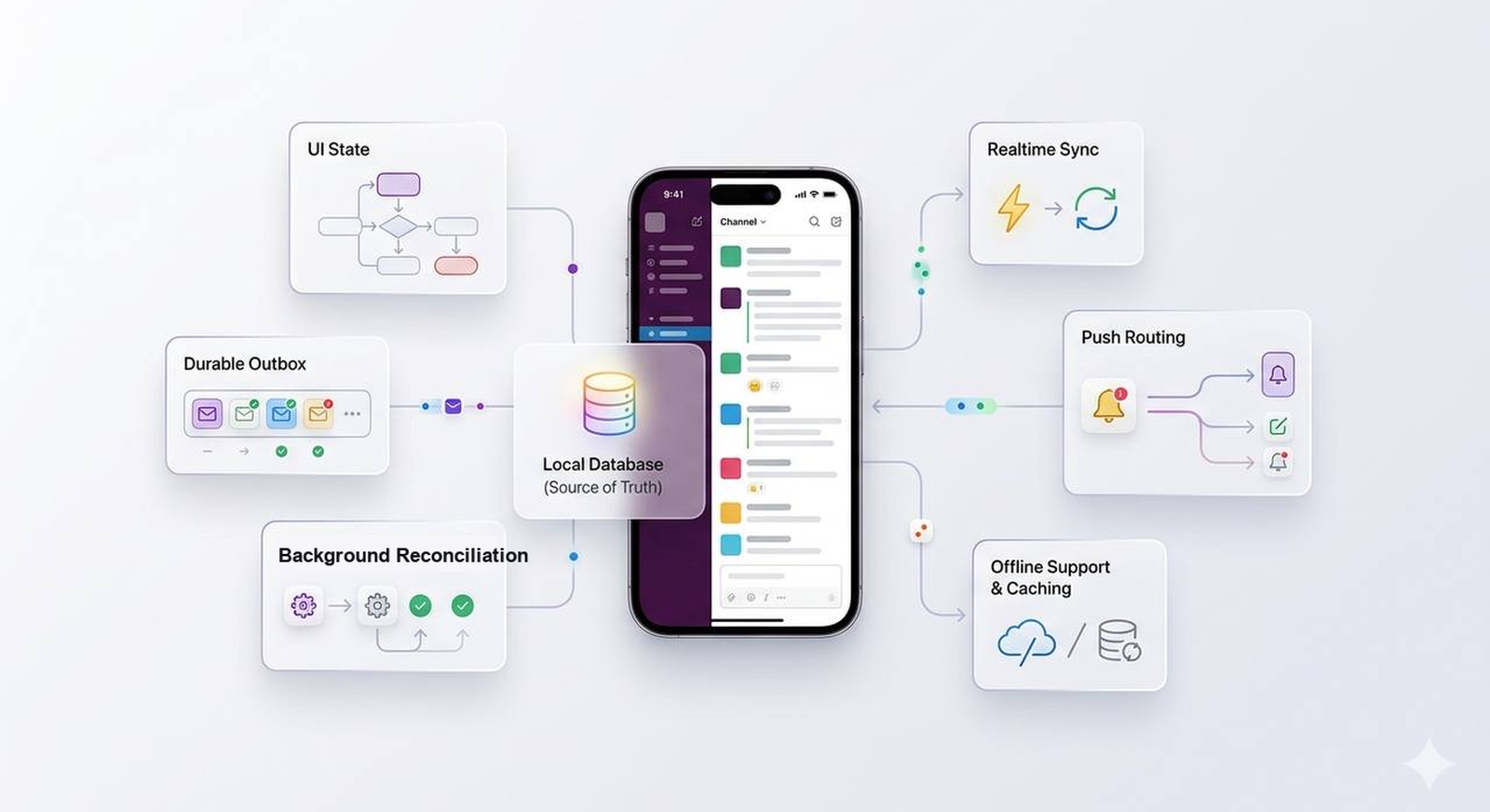
Slack on mobile is not a thin wrapper around APIs. It is a local, occasionally offline, storage-limited replica of a very large product. It has to open fast, show something useful from cache, survive process death, retry sends without duplicates, route push taps into the right workspace, and keep a timeline stable while events arrive from multiple places.
That is the architecture I would want to talk about.
Want to test the client-side ideas first or come back later? Try the Slack client architecture quiz. It focuses on local truth, state ownership, durable outbox retry, push routing, offline UX, accessibility, and client observability.
This post is part of my System design for mobile engineers series.
The interview question
Design the mobile client architecture for a Slack-like app.
I would scope the app to:
- multiple workspaces
- channel and DM lists
- conversation timelines
- threads
- reactions
- file attachments
- unread badges
- push notification taps
- offline reads for recent conversations
- offline sends with retry
- recovery after missed realtime events
I would not redesign every backend service in this answer. If the interviewer wants the backend, I would point them to the system design version of the answer.
Here, I would only bring up APIs when the API contract changes the client design. The send-message API matters because the client needs idempotency. The sync API matters because the client needs cursor repair. The push payload matters because the app needs destination routing. But the full fanout pipeline belongs somewhere else.
What I found while researching
The iOS side is useful, even though Apple does not give us one tidy “MVVM guide.”
Apple’s SwiftUI docs on managing user interface state and model data keep coming back to the same idea: the UI should reflect state. When the state changes, the screen changes.
That sounds obvious until the app gets big.
In a Slack client, state can come from the user typing, a WebSocket event, a push tap, a background refresh, an outbox retry, a local database query, or a server response that arrives after the user has already left the screen. If every path updates the UI differently, the app gets fragile quickly.
Apple’s Core Data docs are relevant for the same reason, even if a real Slack client might use SQLite, GRDB, Core Data, or something else. The exact storage library is not the point. The point is that local persistence is not a cache you sprinkle in later. It is part of the app architecture.
Apple’s guide on using background tasks to update your app is also a useful reminder. iOS will not let the app keep running just because our sync engine has more work to do. The client has to assume work can be paused, resumed, retried, or abandoned.
Slack’s own engineering writing fills in the product reality. Making Slack Feel Like Slack talks about degraded networks, cache coherency, and finite storage on clients. The posts on scaling Slack’s mobile codebases are a reminder that architecture is also about whether a team can keep changing the app safely. Client Consistency at Slack gets at something I keep coming back to: if web, desktop, iOS, and Android all behave differently, users experience that as product inconsistency.
My takeaway is simple:
Do not make the client architecture answer about MVVM alone. Talk about state ownership, local truth, sync, navigation, accessibility, and failure states.
The product bar I would start with
Before drawing boxes, I would say what the app needs to feel like.
A good Slack mobile client should:
- open quickly and show the last useful state
- render a conversation from cache before fresh data arrives
- make sending feel instant
- avoid duplicate messages when retries happen
- keep pending sends after process death
- route push taps to the right workspace and conversation
- keep the timeline from jumping while new messages arrive
- make offline mode understandable without being noisy
- eventually reconcile read state with desktop and web
- work with Dynamic Type, VoiceOver, dark mode, reduced motion, and localization
That is the product bar.
The architecture exists to make those things boring.
The shape I keep coming back to
The client architecture I would draw is not fancy. It is mostly about keeping responsibilities honest.
UI components
  render screen state
  expose user actions
  own small interaction details

Screen state holder
  ViewModel, Observable model, Store, Presenter
  maps local data into screen state
  handles screen events
  calls use cases

Use cases
  send message
  retry failed send
  load older messages
  mark read
  resolve push destination
  observe sync status

Data layer
  repositories
  local database
  remote API
  sync engine
  outbox
  attachment store

Platform services
  push registration
  background tasks
  secure storage
  network monitoring
  logging and tracing
On Android, that might be Compose, ViewModel, Flow, Room, WorkManager, DataStore, and FCM.
On iOS, that might be SwiftUI, Observable models or ViewModels, coordinators, Core Data or SQLite, URLSession, BGTaskScheduler, APNs, and Keychain.
The exact stack matters less than the dependency direction:
- UI should not know how sync cursors work.
- The sync engine should not know how a message row is styled.
- A push handler should resolve a destination, not mutate a random screen.
- A design system component should not know Slack retry policy.
That last one is easy to miss.
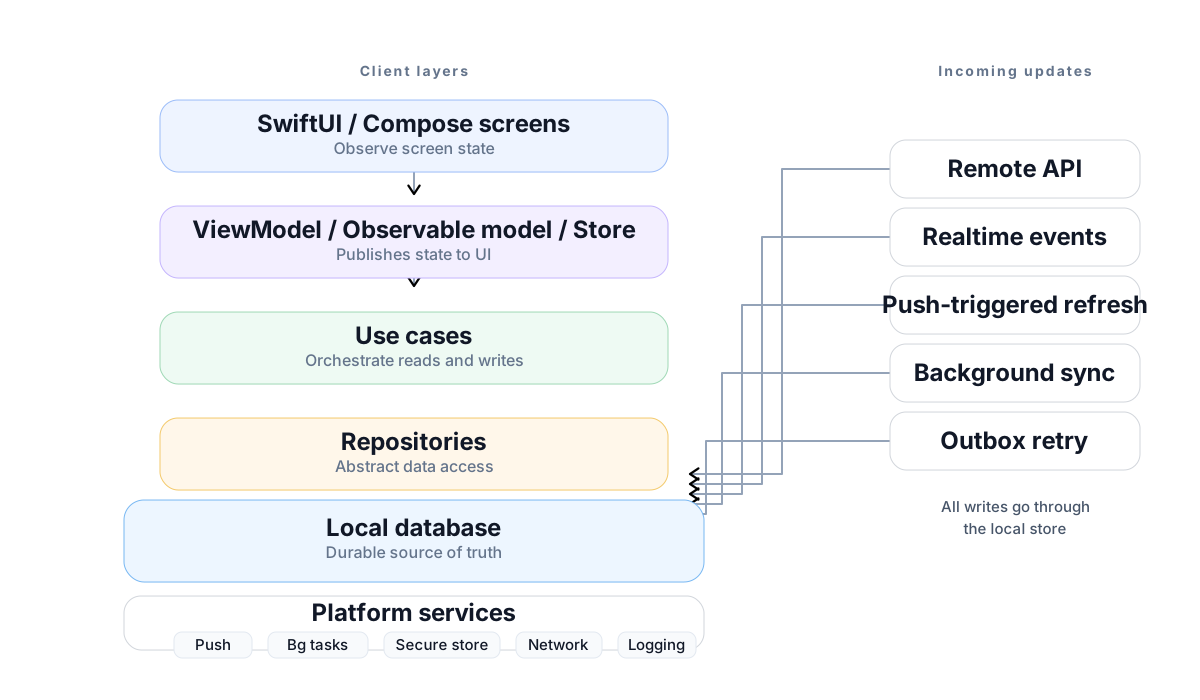
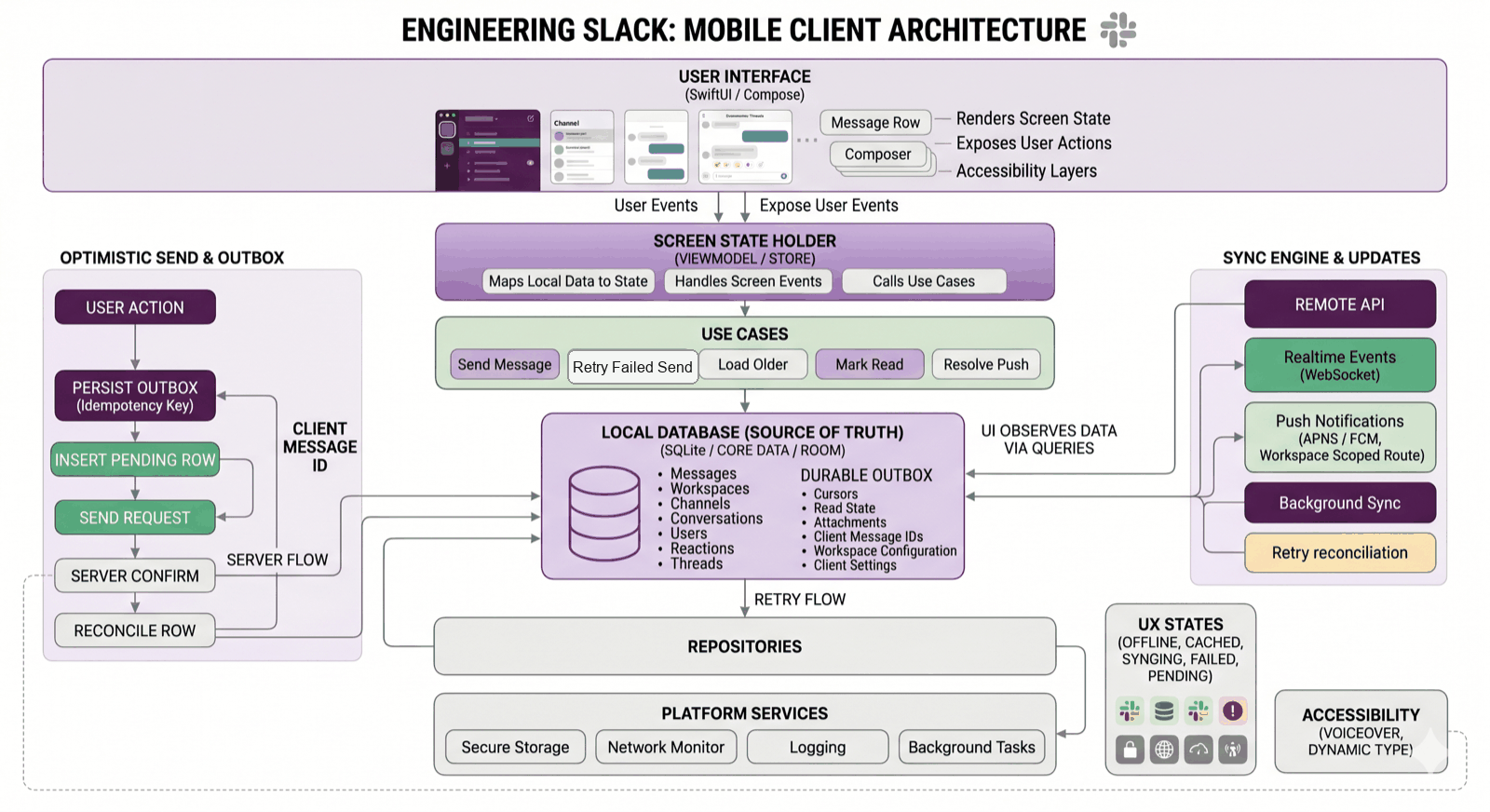
Here is the same idea as a fuller map. I would not start an interview with this much detail, but it is useful as a checklist after the main shape is clear.
Where MVVM fits
MVVM is fine. I would use it for plenty of screens.
For a conversation screen, I might expose something like this:
The view renders ConversationViewState. User actions go back to the ViewModel or Observable model:
onAppearsendTappedretryTappedreactionTappedloadOlderMessagesjumpToUnreadmarkRead
That part is normal.
The trap is letting the ViewModel become the app.
If the ViewModel parses push payloads, owns database transactions, uploads attachments, manages retry policy, builds deep links, logs analytics, and formats every row, it is just a massive view controller with a better name.
For the timeline, I might even prefer a reducer or store-style model. Slack has a lot of explicit state transitions:
- send pending
- send confirmed
- send failed
- retrying
- optimistic reaction applied
- reaction rolled back
- reconnecting
- loading older messages
- repairing a sync gap
- permission changed
Reducer-style state costs more boilerplate, so I would not use it everywhere. But for a realtime timeline, I like that the transitions become visible and testable.
The local store is the durable truth
For Slack, I would make the local database the source of truth for durable product state.
That includes:
- workspaces
- users
- conversations
- membership
- messages
- reactions
- thread summaries
- read state
- pending sends
- attachment upload state
- sync cursors
The UI observes local data. Network responses write to local data. Realtime events write to local data. Push-triggered refresh writes to local data. Background sync writes to local data.
The boring version of the flow is the one I want:
user action or server event
  -> use case or sync engine
  -> repository
  -> local database transaction
  -> observed screen state
  -> UI render
Some state should stay near the UI:
- the text currently in the composer
- whether a reaction sheet is open
- temporary selection state
- local animation state
- a scroll anchor hint
But if the state needs to survive process death, it probably does not belong only in a ViewModel.
That is the line I would draw in the interview:
Durable Slack state lives in the local store. Temporary interaction state can live near the screen.
The outbox is where the product starts feeling real
Optimistic UI can sound like a small UI trick. It is not.
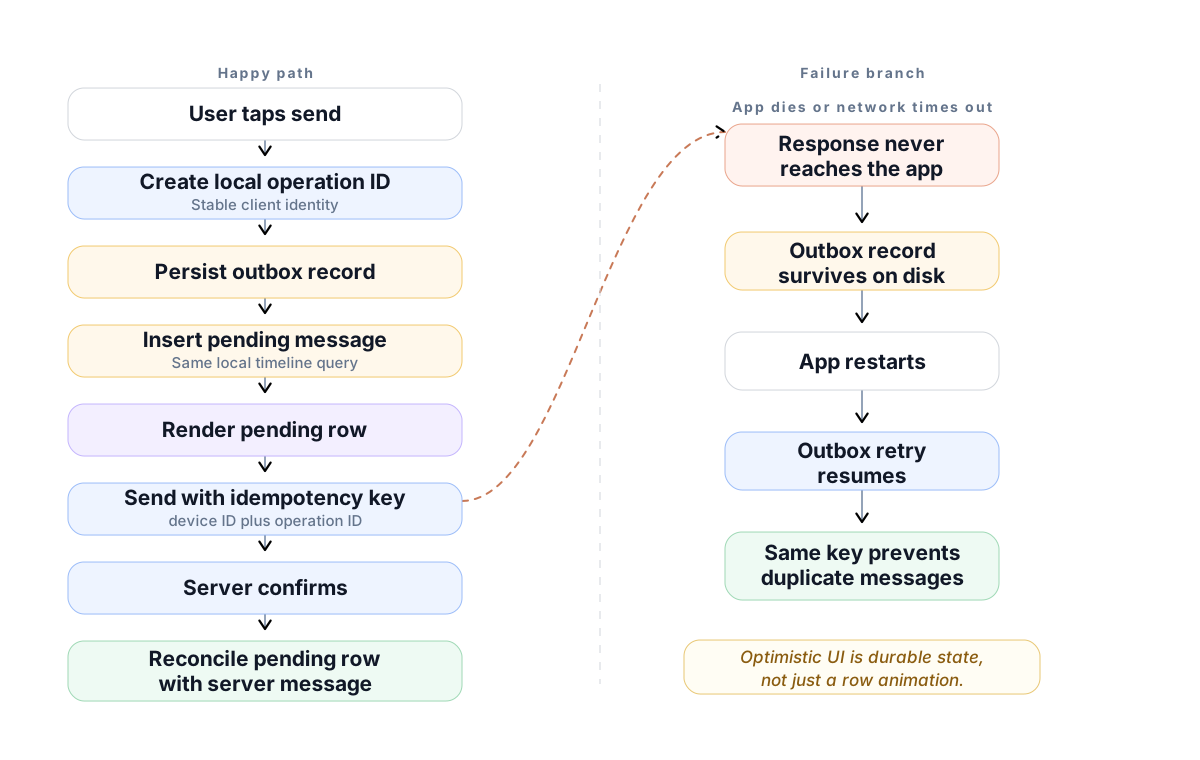
When the user taps send, I would do this:
- Create a local operation ID.
- Persist an outbox record.
- Insert a pending message into the local store.
- Render the pending row from the same timeline query as normal messages.
- Send the request with an idempotency key.
- Reconcile the server response with the pending row.
- Keep retry state durable if the app dies.
The outbox record needs enough information to continue later:
- workspace ID
- conversation ID
- local operation ID
- idempotency key
- payload
- retry count
- last error
- state: pending, sending, failed, confirmed
The hardest case is not “the request failed.” That one is obvious.
The harder case is: the server saved the message, but the phone never got the response. On retry, the server needs to return the same result for the same idempotency key. The client then replaces the pending row instead of showing a duplicate.
Tiny API shape:
POST /v1/workspaces/{workspace_id}/conversations/{conversation_id}/messages
Idempotency-Key: {device_id}:{local_operation_id}
Response:
The client needs both IDs. The server ID is the durable identity. The client ID tells the app which pending row to reconcile.
Sync is not just “refresh”
A Slack client has too many update paths for refresh to be a button-shaped concept.
The app can learn about new state from:
- a realtime event
- a push tap
- foreground refresh
- background refresh
- pagination
- retry reconciliation
- reconnect after being offline
All of those paths should converge into the same local write model. Otherwise the app slowly accumulates one-off fixes.
For sync, I would want an API contract like:
GET /v1/workspaces/{workspace_id}/sync?cursor={cursor}&limit=500If the cursor is too old, I want the server to tell the client how to repair:
The mobile app should not have to guess whether it needs to wipe everything, reload one channel, or fetch a full workspace snapshot.
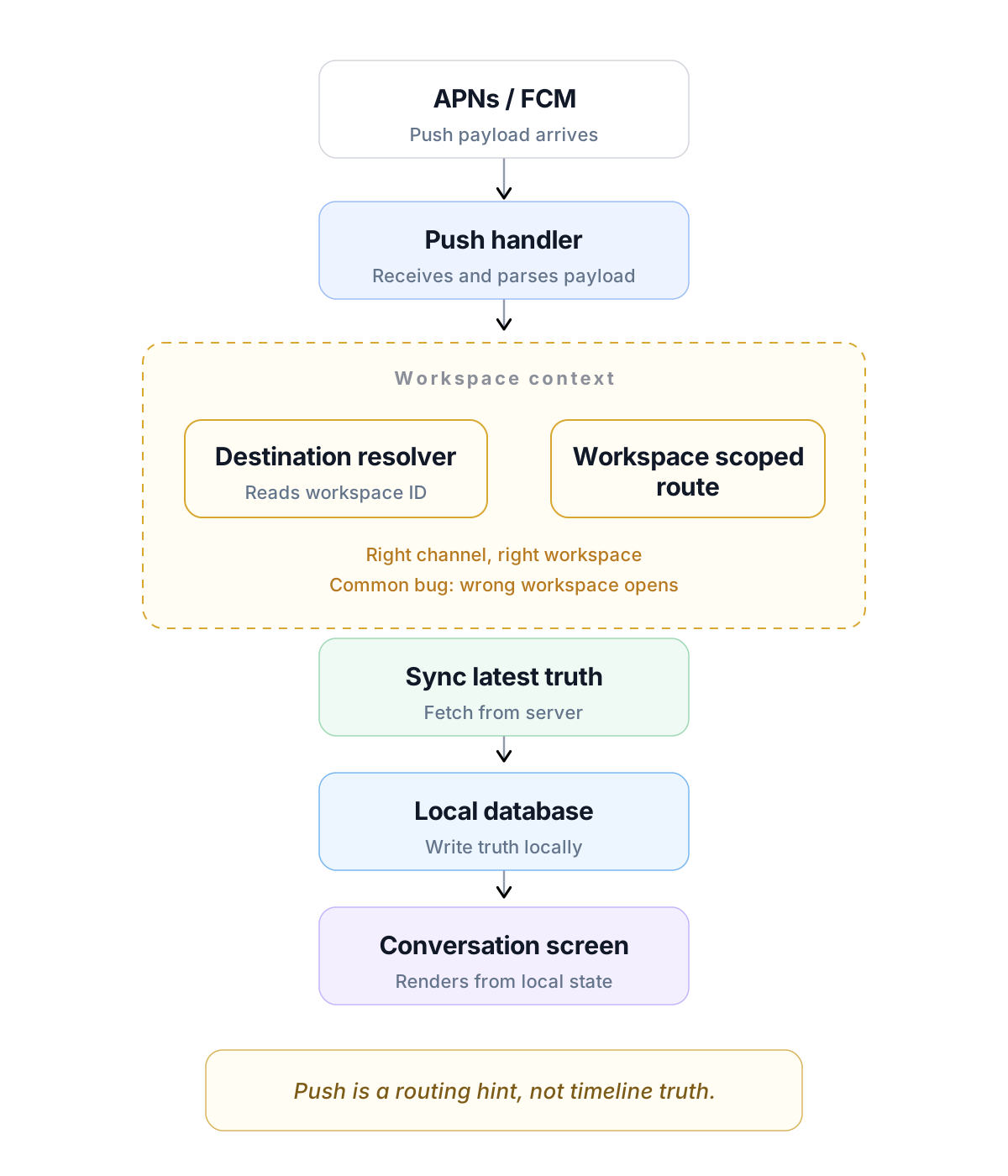
Push is routing, not truth
A push notification can help the app route the user:
- workspace ID
- conversation ID
- thread ID
- event hint
- badge hint
But after the app opens, it still needs to sync.
The user may have already read the message on desktop. The push may be stale. The badge count may be wrong. The channel permission may have changed.
So I would treat push as a hint. It can wake the app or send the user to a destination. It should not be the durable timeline.
This is also where navigation needs its own boundary. The user can enter the same conversation from the channel list, a DM list, a push notification, search, mentions, a thread reply, a deep link, or a workspace switch.
I would use a router, coordinator, or destination resolver. Something like this is enough as a mental model:
The workspace ID matters. A push tap without workspace context is a bug waiting to happen.
UI states are architecture too
This is where client architecture and UX meet.
The conversation screen should have explicit states for:
- no cache and loading
- cached data while refreshing
- online and caught up
- offline with cached data
- offline without cached data
- sync gap repair
- permission lost
- pending send
- failed send
- attachment upload pending
- attachment upload failed
I do not want these to appear as random flags inside row views. They should be modeled so engineers can test them and designers can decide how each one should feel.
A few examples:
- Pending send: show the row immediately with a quiet pending indicator.
- Failed send: keep the text visible, then offer retry and delete.
- Offline with cache: show the messages and a small status surface.
- Offline without cache: explain that the conversation is unavailable offline.
- Sync gap: repair quietly if possible. Ask the user only if the app cannot recover.
The point is not to make failure loud. The point is to make failure understandable.
Design system boundaries
This is the part I would make closer to a real product discussion, not just an architecture diagram.
A Slack conversation screen has a lot packed into it:
- channel header
- timeline
- message row
- sender avatar
- timestamp
- edited and deleted states
- reactions
- thread preview
- attachment preview
- composer
- upload progress
- unread divider
- jump-to-latest button
- offline status
- retry controls
The design system should own primitives:
- typography
- color tokens
- spacing
- buttons
- sheets
- menus
- avatars
- badges
- skeletons
- error surfaces
- accessibility defaults
The Slack feature should own product behavior:
- when a message is pending
- how retries work
- how deleted messages render
- how reactions are grouped
- how thread summaries are worded
- when stale state appears
That split matters.
If the design system owns Slack-specific retry logic, it becomes a junk drawer. If every feature invents its own buttons, menus, colors, loading states, and accessibility behavior, the product stops feeling like one app.
This is the same lesson I keep running into with server-driven UI and design systems. Shared UI needs strong primitives, but product behavior still needs to live with the feature that understands the context.
Accessibility is part of the architecture
Message rows are dense.
A row might include the sender, timestamp, message text, reactions, attachments, thread replies, edited state, failed state, and an action menu. If every subview exposes itself independently, VoiceOver can become exhausting.
I would build message components with accessibility in mind from the beginning:
- useful VoiceOver labels for message rows
- clear reaction button labels with counts and selected state
- reachable retry controls
- Dynamic Type layouts that do not collapse
- contrast-safe tokens in light and dark mode
- reduced motion support
- attachment labels that say what the file is
- focus order that follows the conversation
Slack has a good post on making the Slack iOS app accessible. I like it because it treats accessibility as normal product engineering, not a cleanup pass at the end.
What I would test
I would not just say “write unit tests.”
For this client, I would test the paths most likely to drift:
- ViewModel or store state transitions
- pending send to confirmed message reconciliation
- retry after timeout
- duplicate event handling
- sync gap repair
- push tap routing
- workspace-scoped navigation
- database migrations
- cache eviction
- accessibility labels for key message states
- screenshots for loading, offline, pending, failed, and empty states
The happy path is easy to demo. The broken paths are where the architecture shows up.
What I would measure
Backend latency does not tell the whole story.
For the client, I would measure:
- cold start to first useful render
- conversation open to cached render
- conversation open to fresh data
- send tap to pending row
- send tap to server confirmation
- retry success rate
- age of oldest outbox item
- sync gap frequency
- push tap to destination render
- timeline scroll performance
- attachment upload failure rate
- crash-free sessions by feature
If a user says Slack feels slow, I want to know where the time went. Local database query? JSON parsing? Network? Server? Sync merge? UI rendering? Attachment preview?
Without client telemetry, the team ends up guessing.
How I would explain it in the interview
I would keep the spoken version tight:
I would build the Slack mobile client around a local source of truth and predictable state flow. The UI renders screen state and sends events. A ViewModel, Observable model, or store maps local data into screen state and calls use cases. Repositories write to a local database, and every update path goes through that data layer: API responses, realtime events, push-triggered refresh, background sync, and outbox retry. Pending sends live in a durable outbox with idempotency keys, so retries do not create duplicates. Navigation is workspace-scoped so push taps and deep links land in the right place. I would model offline, cached, syncing, pending, failed, and repaired states explicitly because those are the states users actually feel.
Then I would follow the interviewer.
If they want iOS, I would talk about SwiftUI state, Observable models, coordinators, Core Data or SQLite, URLSession, background tasks, APNs, Keychain, and XCTest.
If they want Android, I would talk about Compose state, ViewModel, Flow, Room, WorkManager, FCM, DataStore, and instrumentation.
If they want UX, I would talk about cached rendering, retry controls, offline surfaces, accessibility, and timeline stability.
If they want architecture, I would talk about source of truth, outbox, sync repair, module boundaries, and dependency direction.
How this differs from the system design post
The Slack system design post is about the product system around the app:
- message APIs
- durable message storage
- realtime fanout
- sync cursors
- push notification pipeline
- search indexing
- file upload processing
- read state across devices
- backend scaling and failure modes
This client architecture version is about the app that has to live with that system:
- screen state ownership
- local data ownership
- optimistic UI
- outbox retry
- push routing
- workspace-scoped navigation
- offline UX states
- accessibility
- client testing
- client observability
They are connected, but they are not the same post.
One designs the product system.
The other designs the app that has to live with that system on a real phone.
Now that you have read it, try the Slack client architecture quiz. Twelve questions, about ten minutes, with explanations for each answer.
What I would study next
For the client-focused version, I would keep these open:
- Apple’s Managing user interface state
- Apple’s Model data
- Apple’s Core Data
- Apple’s Using background tasks to update your app
- Apple’s Human Interface Guidelines
- Android’s Guide to app architecture
- Android’s UI layer and unidirectional data flow
- Android’s Build an offline-first app
- Slack’s Making Slack Feel Like Slack
- Slack’s Scaling Slack’s Mobile Codebases
- Slack’s Client Consistency at Slack
- Slack’s Ways we make the Slack iOS app accessible
If this was useful, you can buy me a coffee ☕. If you have a question, correction, or a product you want me to think through next, leave a comment.
If you have seen a version of this question in an interview, I would love to hear what part felt hardest: requirements, APIs, mobile state, scale, offline behavior, or tradeoffs.
Comments
Loading…