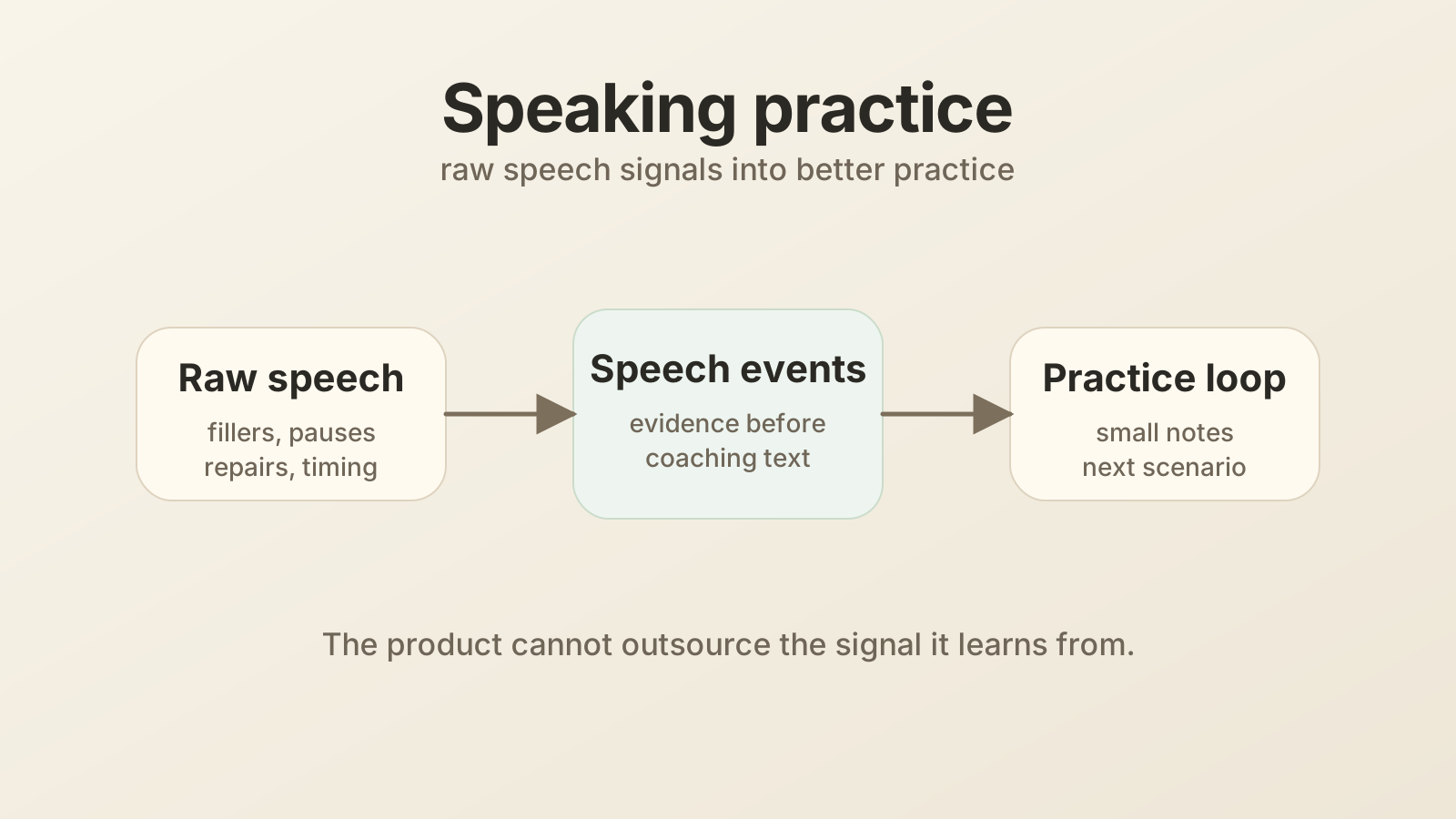
Design a spoken English practice app for mobile engineers
I started building TalkLooper, a small iOS app for spoken English practice, because I wanted to improve my spoken English with practice that used my own user-initiated conversations instead of a fake lesson flow. The TalkLooper repo is public as a demo and source reference, not as a self-serve app people can run. If someone wants to try the real app, I can send a TestFlight invite on request. The interesting part here is not the repo setup. It is the architecture mistake I made first.
The first architecture was tempting: let Claude handle the conversation and audio, connect TalkLooper through MCP, and have TalkLooper analyze what Claude logged. The iOS app could stay small. Claude already had voice mode. The backend only needed a secure MCP endpoint, Supabase storage, and a few practice loops.
That design was elegant on paper. It also exposed the main product lesson.
For language learning, the raw signal matters. A cleaned transcript is not enough.
Claude was helpful as a practice partner, but it kept normalizing what I said. Filler words disappeared. Grammar got corrected. Awkward phrasing became smoother. By the time TalkLooper saw the transcript, the most useful learning data had already been edited away.
So this post is a system design pass on TalkLooper, but it is also a design note about ownership. If TalkLooper learns from speech behavior, it cannot outsource the speech signal too early.
Practice quiz: Want to test the ideas first or come back later? Try the Spoken English practice app design quiz. It covers MCP boundaries, raw audio, speech events, consent, storage, feedback loops, and mobile reliability.
This post is part of my System design for mobile engineers series.
Problem statement
Design TalkLooper: an iOS app that helps someone improve spoken English through real practice. For the rest of this post, I will use TalkLooper as the concrete product name.
A user should be able to:
- Practice a conversation.
- Capture speech patterns such as fillers, hedging, vague phrasing, pronunciation issues, and long pauses.
- See a small number of useful observations.
- Turn those observations into short practice scenarios.
- Track improvement over time without feeling judged.
The hard part is not building another chat UI. The hard part is capturing the right learning signal without making TalkLooper creepy, heavy, or fragile.
The mobile-specific goal is this:
TalkLooper should capture enough raw speech signal to teach well, while keeping the user in control of recording, privacy, and feedback.
That sentence changes TalkLooper’s architecture.
What the first version did
The first design split work across three systems:
- Claude voice: conversation partner and audio interface.
- TalkLooper MCP backend: tool server that Claude could call during a practice session.
- TalkLooper iOS app: dashboard for goals, observations, practice scenarios, progress, and settings.
The repo already had this shape:
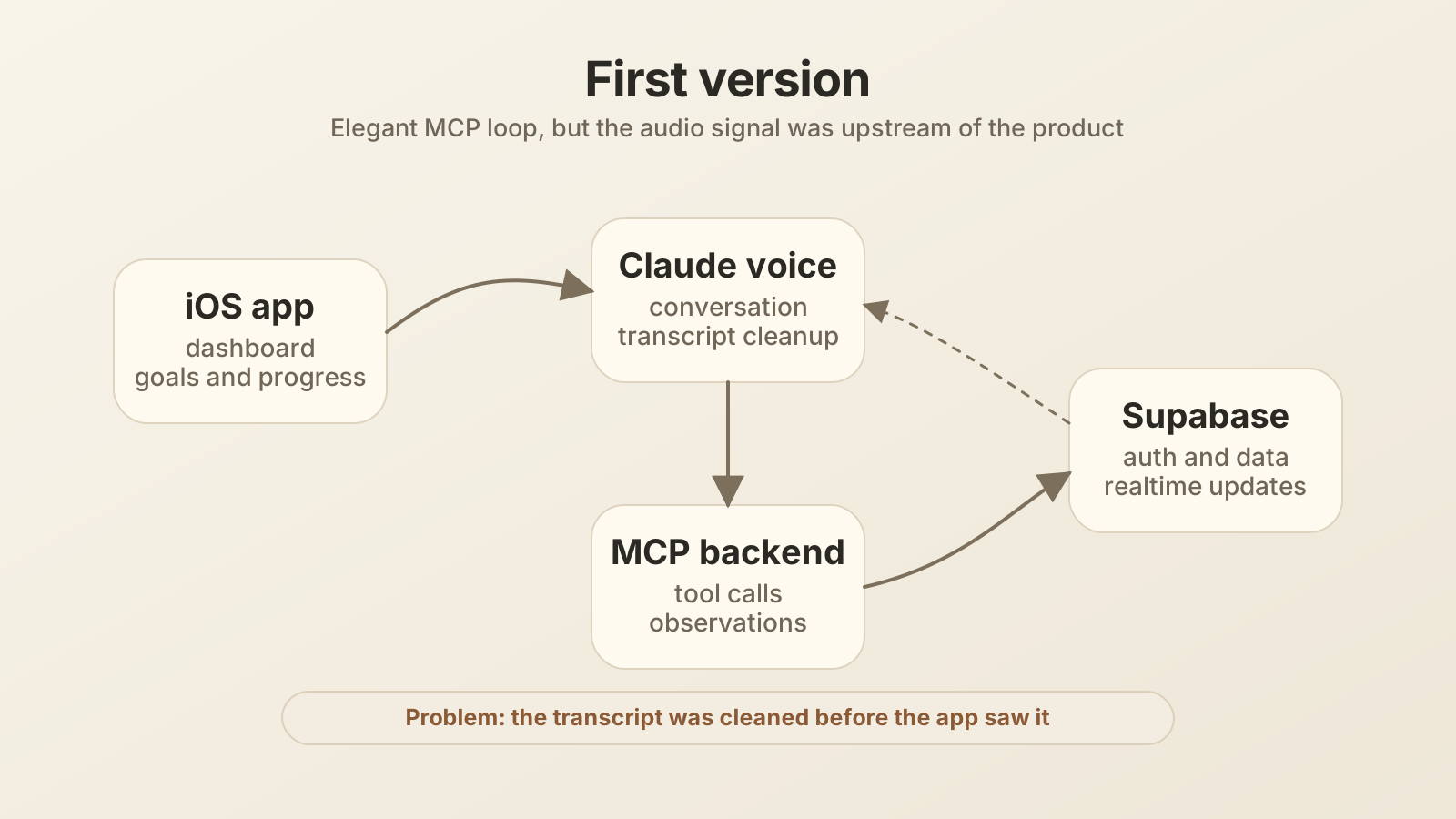
The backend was TypeScript on Vercel. Supabase handled auth, Postgres storage, Realtime, and RLS. The iOS app used SwiftUI, Swift Concurrency, and @Observable view models. Claude connected to a per-user MCP URL, then called tools such as log_observation, get_active_goals, get_recent_observations, and end_practice_session.
From an engineering point of view, the design had good instincts:
- It avoided building a custom voice stack too early.
- It reused Claude as the speaking partner.
- It kept TalkLooper focused on product UI.
- It used MCP tools as a narrow integration boundary.
- It stored structured observations instead of full conversations by default.
That is why I liked the idea. It removed a lot of app overhead.
The failure mode
The first architecture treated Claude as both the practice partner and the audio layer. That is where TalkLooper broke down.
Language learning often depends on details that a helpful assistant tries to hide:
- filler words: “um”, “uh”, “like”
- false starts
- repeated words
- long pauses
- pronunciation confidence
- intonation
- pace
- grammar mistakes before correction
- self-repair, where the user starts one sentence and fixes it midstream
A polished transcript can be a lossy compression of speech. It preserves meaning, but it can erase learning signals.
For example, if I say:
Um, I think maybe we can, like, try to explain the problem from the customer side.
A helpful model might turn that into:
I think we can explain the problem from the customer side.
The second sentence is better writing. It is worse evidence.
TalkLooper needed to know that I used a filler, softened the recommendation, and took a longer path to the point. The cleaned transcript hides exactly that.
This is the key system design lesson:
If TalkLooper is built around raw user behavior, do not put a normalizing model before the learning pipeline.
Claude can still be part of TalkLooper. It just should not be the only place where audio becomes data.
Requirements
Functional requirements
For a stronger version, I would support:
- Sign in with Apple.
- Explicit microphone permission and recording controls.
- Short practice sessions, around 10 to 15 minutes.
- Raw audio capture for user speech during practice.
- Streaming or chunked speech events for analysis.
- A transcript, but only as one layer of evidence.
- Observation logging with concrete replacements, not vague advice.
- A small active-goal limit, usually one or two focus areas.
- Scenario prompts that target the current goal.
- Claude deep links or MCP prompts for practice partner flows.
- Realtime updates from backend analysis to the iOS dashboard.
- Push reminders for spaced resurfacing.
- User controls to delete recordings, discard sessions, and mark observations as wrong or context-dependent.
Non-functional requirements
The important system requirements are:
- Recording must be consent-first and easy to stop.
- Audio upload should tolerate flaky mobile networks.
- TalkLooper should not store raw audio forever by default.
- Analysis should separate raw signal, transcript, and coaching interpretation.
- Feedback should be task-focused, not self-focused.
- The user should not see a giant error dashboard.
- The backend should avoid long-running work inside mobile request paths.
- The system should support auditability: what evidence led to an observation?
- TalkLooper should work before it becomes a full speech coaching platform.
Product behavior before architecture
A good TalkLooper session should feel simple:
- The user chooses a practice scenario.
- TalkLooper explains what will be recorded and why.
- The user starts practice.
- TalkLooper captures audio locally and sends safe chunks to the backend.
- The user practices with an in-app partner, or uses Claude for text-guided roleplay while TalkLooper owns recording.
- The backend turns speech evidence into a few observations.
- TalkLooper shows one or two useful next steps.
- The next session uses those patterns for targeted practice.
The user should feel coached, not graded.
That product feeling affects the data model. Calling something a “mistake” is too harsh. TalkLooper uses “observations” because some patterns are context-dependent. Hedging is not always bad. A pause is not always bad. A filler below a low threshold may not matter. TalkLooper should help the user notice patterns, not force a universal speaking style.
Revised architecture
I would separate the system into two loops:
- Practice loop: low-latency conversation and recording.
- Learning loop: slower analysis, goal selection, spaced resurfacing, and progress.
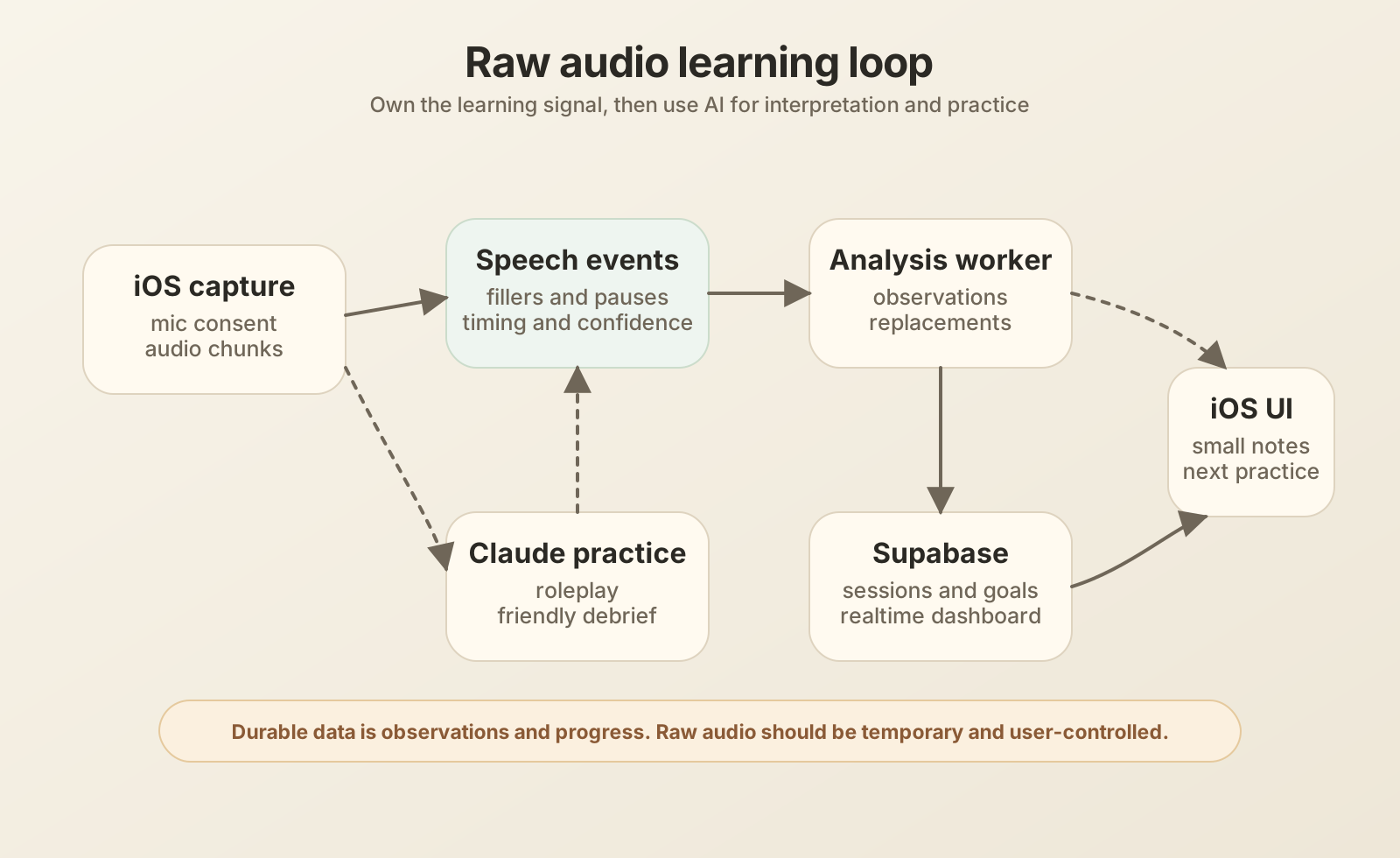
The revised architecture has six main pieces:
- iOS capture layer: owns microphone permission, session state, audio chunks, local buffering, and upload retry.
- Speech event pipeline: converts raw audio into transcript, timing, confidence, filler events, pause events, pronunciation hints, and segment metadata.
- Analysis worker: turns speech events into observations with evidence and concrete replacement behavior.
- Supabase: stores profiles, goals, observations, sessions, patterns, device tokens, and short-lived audio references.
- Claude integration: still useful for practice prompts, scenario roleplay, and coaching language. In the raw-audio version, Claude should not be the external voice layer that owns the microphone.
- iOS dashboard: shows the smallest useful set of observations, scenarios, progress, and controls.
The main change is the boundary. TalkLooper owns capture. The backend owns analysis. Claude helps with prompts, roleplay text, and debrief language. No single model gets to quietly rewrite the source signal before TalkLooper sees it.
Audio capture on iOS
The iOS app should have a small capture service around AVAudioEngine. It does not need to be fancy in v1, but it needs to own a few facts clearly:
- session id
- recording state
- sample format
- chunk sequence number
- local file path or buffer id
- upload status
- user consent state
- discard state
I would not make every screen talk to audio APIs directly. A RecordingSessionService can expose simple operations:
startSession(scenarioId)pauseSession()resumeSession()finishSession()discardSession()
The ViewModel can stay boring. It asks the service to start, shows recording state, and reacts to progress. The capture service deals with audio engine setup, interruptions, route changes, app background behavior, and chunk writing.
This also keeps testing sane. ViewModels can be tested with a fake recording service. Audio behavior can be tested closer to the service boundary.
Raw audio is not the product UI
Owning raw audio does not mean showing raw audio to the user.
Most users do not want waveforms, token timestamps, diarization metadata, or phoneme confidence scores. They want to know what to practice next.
So the architecture should keep three layers separate:
- Evidence: raw audio chunks, timestamps, transcript alternatives, filler events, pause events, confidence scores.
- Observation: “You softened the recommendation with maybe and I think.”
- Practice action: “Try: I recommend we explain the problem from the customer side.”
TalkLooper can store evidence for a short time, then keep durable observations and derived pattern metrics. That gives TalkLooper a way to debug bad feedback without turning the database into a permanent archive of private speech.
Speech events before coaching
A simple transcript is not enough. I would create a speech event layer before the coaching layer.
A speech event is a small, typed fact:
Other event types might include:
pauseself_repairhedge_phraserepetitionpace_changepronunciation_low_confidencegrammar_candidatevocabulary_candidate
Some of these can come from speech recognition. Some might come from a model. The important part is that TalkLooper stores the intermediate facts separately from the final coaching sentence.
That separation helps with trust. If an observation feels wrong, TalkLooper can tell whether the issue came from transcription, event detection, or coaching interpretation.
Backend flow
A revised backend request flow could look like this:
- iOS starts a practice session and gets a session id.
- iOS records local audio chunks.
- iOS uploads chunks with sequence numbers and idempotency keys.
- The backend stores short-lived audio references and marks chunks as received.
- A worker runs speech-to-text and event extraction.
- The analysis worker creates observations, patterns, and next resurfacing dates.
- Supabase Realtime notifies the iOS app when observations are ready.
- The user sees a small debrief and can keep, edit, or discard the session.
TalkLooper should not wait for full analysis before ending the session. It can show:
Analysis is processing. I will show one or two useful notes when they are ready.
That is honest and resilient. It also prevents the session ending from depending on a long model call.
Data model changes
The current repo already has good tables: profiles, MCP tokens, observations, learning goals, patterns, practice scenarios, practice sessions, device tokens, and milestones.
For raw audio, I would add a few narrow tables rather than overloading observations:
practice_audio_chunks
Stores upload state and temporary audio references.
idsession_iduser_idsequence_numberstorage_pathduration_mscreated_atexpires_atdeleted_atupload_status
speech_events
Stores extracted evidence.
idsession_iduser_idchunk_idevent_typetextstart_msend_msconfidencemetadata
observation_evidence
Links a durable observation back to one or more events.
observation_idspeech_event_idweight
This keeps the durable product model clean. observations remains the user-facing coaching unit. Speech events and audio chunks remain evidence.
MCP still has a place
I would not remove MCP from the design. I would change its job.
MCP tools are still a nice way for Claude to read active goals, start practice prompts, and log high-level observations during a conversation. The problem was using Claude as the only audio path.
A better split is:
- Claude gets context: goals, recent patterns, current scenario.
- Claude helps write roleplay prompts, partner lines, and debrief copy.
- If the practice partner is voice-based, TalkLooper should use an in-app voice flow so its own recording pipeline sees the user’s speech first.
- TalkLooper records the user’s speech directly with consent.
- TalkLooper analyzes raw audio and speech events.
- Claude can help turn the result into a friendly debrief, but the evidence comes from TalkLooper’s pipeline.
This makes MCP an orchestration layer, not the source of truth for speech.
Realtime dashboard
Supabase is still a good fit for the dashboard.
TalkLooper can read and write normal product data through Supabase with RLS. It can use Supabase Realtime to update the History or Home tab when a session finishes analysis.
For example:
PracticeSessionViewModelstarts a session.RecordingSessionServiceuploads audio chunks.- Backend workers insert observations.
RealtimeServicereceives a row change.HistoryViewModelappends the new observation.HomeViewModelrefreshes recommended scenarios.
This gives TalkLooper a live feel without making the mobile client run analysis locally.
Feedback policy
The system should be careful with feedback.
TalkLooper’s pedagogy notes already point in a good direction:
- focus on the task, not the person
- substitute, never suppress
- use early wins
- respect context
- show self-referenced progress only
The architecture should enforce some of that.
For example, log_observation should require a replacement field. An observation should not say:
You use too many fillers.
It should say:
In this answer, you opened with “um” and paused before the main point. Try starting with: “The main tradeoff is latency versus privacy.”
The database can require concrete replacements. The UI can limit how many observations appear at once. The worker can avoid creating a giant list of corrections. Product values become system constraints.
Privacy and retention
Raw audio raises the trust bar.
I would design the default around short retention:
- Audio chunks are temporary.
- The user can discard a session.
- The user can delete individual observations.
- Durable data stores derived observations, not permanent recordings.
- Sensitive processing states are visible in the app.
- Upload and analysis errors do not leak private text into logs.
TalkLooper should also make recording state obvious. On iOS, microphone permission is not just a system prompt. TalkLooper should explain what is recorded, why it is useful, and how to stop or delete it. If practice includes another person instead of a solo roleplay, TalkLooper should require clear participant consent before recording.
If the user cannot explain the recording model back in one sentence, TalkLooper probably needs simpler copy.
Mobile failure modes
This design has several mobile failure modes worth naming.
Upload fails mid-session
TalkLooper should keep chunks locally until retry succeeds or the user discards the session. Each chunk needs a sequence number and idempotency key so retry does not create duplicates.
App goes to background
TalkLooper should pause or stop recording clearly. I would avoid clever background recording in v1 unless it is needed. A visible practice session is easier to trust.
Analysis is wrong
The user should be able to mark an observation as wrong, context-dependent, or resolved. That feedback can improve future analysis and keep the product from feeling judgmental.
Claude gives a better-sounding but inaccurate debrief
Do not let generated coaching text overwrite evidence. The debrief should be grounded in stored observations and speech events.
Network is slow after practice
The session can end locally. Analysis can finish later. Push can notify the user when a useful debrief is ready through User Notifications.
Why not analyze everything on device?
On-device analysis is attractive for privacy and latency. It is also a lot of product surface.
Apple’s Speech framework can help with recognition, and some signal processing can happen locally. But a v1 still has to handle model quality, languages, device differences, battery, storage, permissions, and fallback behavior.
I would start with a hybrid:
- record and buffer on device
- extract cheap local metadata when practical
- upload short chunks for server analysis
- delete raw chunks after the retention window
- keep the door open for more on-device processing later
That is not the purest privacy design, but it is a realistic first version if the goal is to learn whether the coaching loop works.
What I would build first
I would not start by building the whole speech platform.
I would build one narrow loop:
- One practice scenario.
- Explicit recording start and stop.
- Chunked upload with retry.
- Transcript plus filler and pause events.
- Two observation types: filler words and hedging.
- A debrief with one strength and one practice action.
- A way to discard the session.
That is enough to test the TalkLooper thesis:
Does raw speech evidence produce better practice than a cleaned transcript?
If the answer is yes, the next steps are clear: more event types, better pattern grouping, spaced resurfacing, richer scenarios, and better progress views.
If the answer is no, I would rather learn that before building a large audio platform.
The design lesson
The first TalkLooper architecture had a good engineering instinct: avoid building expensive infrastructure until TalkLooper proves it needs it.
The mistake was choosing the wrong thing to avoid.
Voice infrastructure is overhead for many apps. For TalkLooper, speech signal is the product. If TalkLooper cannot see fillers, pauses, repairs, and pronunciation uncertainty, it cannot teach the user what they actually need to practice.
So the better design is not “build everything ourselves.” It is more specific:
- own the raw learning signal
- outsource the conversation partner where it helps
- keep evidence separate from coaching text
- store durable observations, not permanent recordings
- make feedback small, concrete, and user-controlled
That is the system I would build next.
If you want to see the actual implementation behind the first version, I am sharing the TalkLooper source code on GitHub. It is a demo/source reference repo, not a self-serve runnable app. If you want to try TalkLooper, reach out and I can send a TestFlight invite.
Further reading
- TalkLooper demo/source reference repo
- Model Context Protocol tools
- Apple AVAudioEngine
- Apple Speech framework
- Supabase Realtime
- Apple User Notifications
If this was useful, you can buy me a coffee ☕. If you have a question, correction, or a product you want me to think through next, leave a comment.
If you have seen a version of this question in an interview, I would love to hear what part felt hardest: requirements, APIs, mobile state, scale, offline behavior, or tradeoffs.
Comments
Loading…