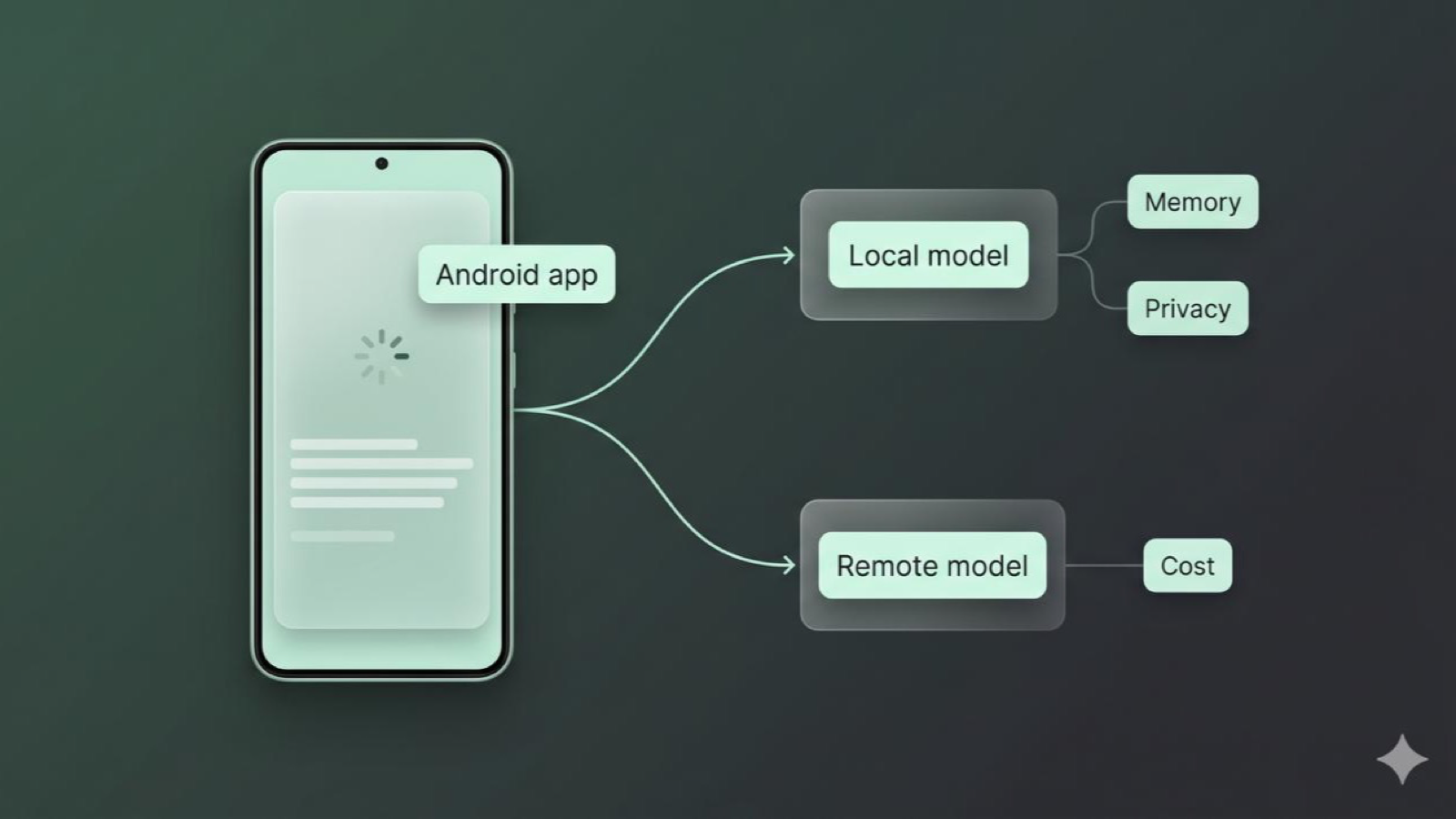
Android LLM client architecture in 2026
LLM features on Android are starting to look less like one API call and more like product architecture.
A good Android LLM client in 2026 has to decide what runs on device, what goes to a remote model, how a Compose screen streams partial output, how memory is stored, what leaves the phone, and how much each request can cost. If the app records audio, reads files, remembers user preferences, or calls tools, the client is not a thin wrapper anymore.
This post focuses on LLM-powered Android apps where the main product surface is chat, copilot-style help, or streamed model output. It is not trying to cover every kind of AI app, like camera ML, recommendations, background classifiers, or photo editing.
This is the architecture I would start from.
Want to test the ideas first or come back later? Try the Android LLM client architecture quiz. It focuses on local versus remote inference, streaming state, context, privacy, cost, and mobile failure modes.
This post is part of my System design for mobile engineers series.
The problem
The easy version of an AI feature is a text box, a send button, and a call to a model provider.
That is fine for a demo. It is not enough for a real Android app.
Real apps need to answer questions like:
- Should this prompt run locally or remotely?
- Can the user use the feature offline?
- What happens when the stream fails halfway through?
- Which messages and summaries are stored on device?
- Which parts of the prompt can be sent to a remote provider?
- How do we stop one chat from turning into a huge context window?
- How do we avoid leaking prompts into logs, analytics, or crash reports?
- How do we control token cost without making the product feel broken?
The mobile-specific goal is this:
Build the AI feature as a client system with routing, state, memory, privacy, cost, and failure handling, not as a screen around a single SDK.
This is not the architecture of any one AI app. I am using public Android, AI SDK, and mobile architecture patterns to reason about a practical 2026 client.
The reference architecture
At a high level, I want the Android app to own product state and policy, while model providers own model execution.
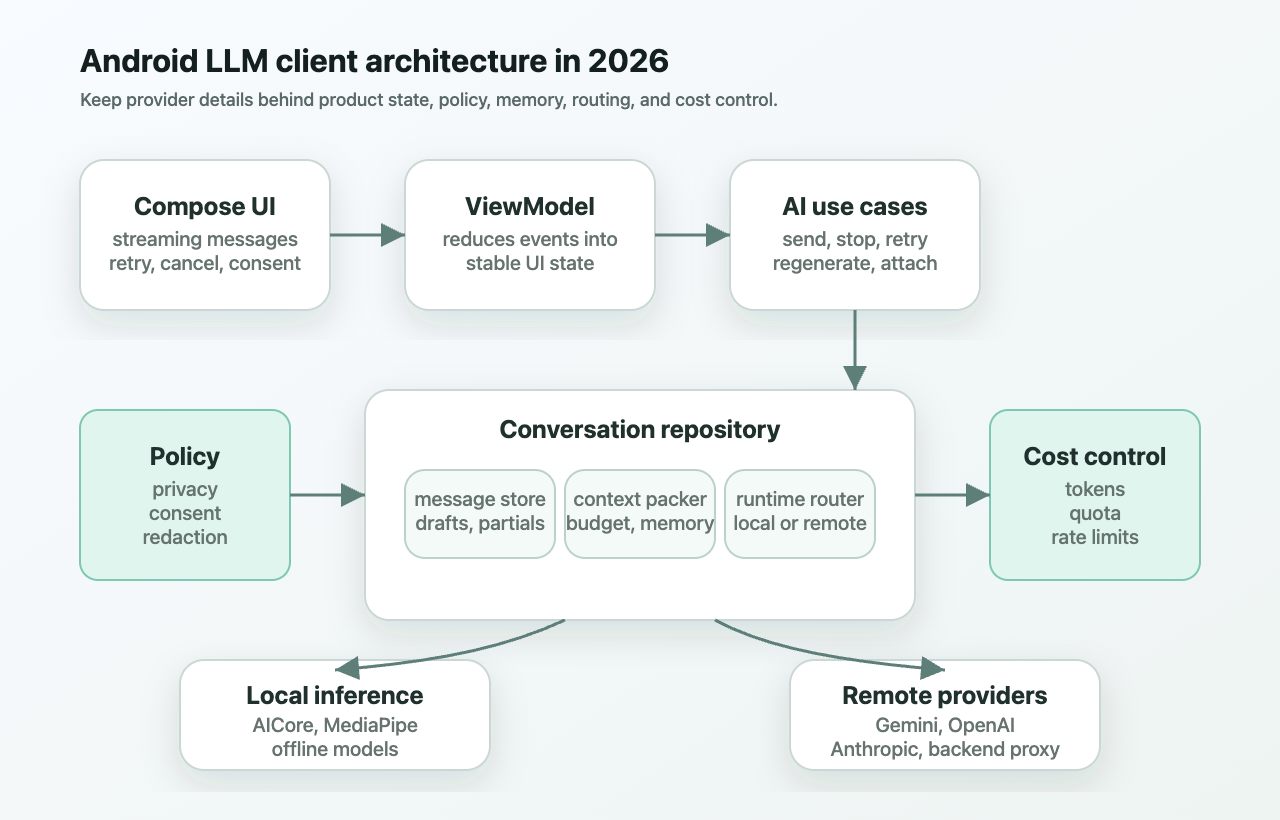
The important pieces are:
- Compose UI: renders messages, streaming output, loading states, retry, cancel, and privacy prompts.
- ViewModel: reduces stream events into one stable screen state.
- Conversation repository: owns chat history, drafts, pending turns, local persistence, and sync boundaries.
- Context packer: decides what goes into the next model request.
- Runtime router: chooses local, remote, or hybrid inference.
- Provider layer: normalizes OpenAI-style, Gemini-style, Anthropic-style, and local model events.
- Memory store: separates transcript, summaries, retrieval snippets, and user-approved preferences.
- Policy layer: classifies sensitive data and decides what may leave the device.
- Cost and rate limiter: estimates tokens, applies budgets, tracks provider quota, and records usage.
If I only had one sentence for the design, it would be this:
The UI should stream product state, not provider details.
A Compose screen should not care whether the text came from Gemini Nano through AICore, a MediaPipe local model, OpenAI over SSE, Anthropic over SSE, or a backend proxy. It should render the same ChatUiState either way.
Local model, remote model, or both
Android now has several local AI paths, but local inference is not a free win.
Google’s Android AI docs describe a mix of on-device, cloud, and hybrid AI. Gemini Nano runs through AICore, which manages model distribution, updates, safety, and hardware acceleration on supported devices. The docs also call out privacy properties like request isolation, no direct AICore internet access, and not storing request data.
MediaPipe LLM Inference for Android is a different local path. It can run compatible models on device, supports streaming responses, and gives you options like max tokens and LoRA for supported models. The tradeoff is that you now care about model download, storage, RAM, hardware acceleration, thermal behavior, and device gating. Google’s performance guidance for MediaPipe also pushes you to think about delegates, CPU/GPU behavior, and benchmarking on target devices instead of assuming one local path works everywhere.
That is the real product work: not just whether local inference works, but how the app explains download size, device support, offline availability, thermal limits, and fallback.
I would not encode this as if localSupported then local else remote. I would use a router.
interface AiRuntimeRouter {
    suspend fun choose(request: AiRequest): AiRoute
}
The router should look at:
- task type: rewrite, summarization, chat, image reasoning, audio, tool use
- data sensitivity: local-only, user-approved remote, or safe remote
- device state: model installed, RAM, battery, thermal state
- network state: offline, metered, poor connection, captive portal
- context size: short prompt, long transcript, attachment-heavy request
- product policy: free tier, paid tier, enterprise privacy mode
- provider health: outage, rate limit, slow response, quota exhausted
A small rewrite can run locally. A long multimodal reasoning task may need remote inference. A sensitive transcript may need local-only mode or explicit user consent. A failed remote call may fall back to local only if the local model can preserve the product promise.
That last part matters. Fallback is not just technical. If the remote model was using tools, large context, or strict policy checks, a smaller local model may not be an equivalent answer.
Provider abstraction should be capability-first
A weak provider abstraction looks like this:
interface AiClient {
    suspend fun ask(prompt: String): String
}
That gets painful quickly. Providers differ in streaming events, model discovery, tool calls, token usage, prompt caching, context windows, multimodal support, rate limits, and safety responses.
A better abstraction starts with capabilities and stream events.
interface AiProvider {
    fun stream(request: AiRequest): Flow<AiStreamEvent>
    suspend fun models(): List<ModelDescriptor>
}
Each model needs metadata the app can actually use:
data class ModelDescriptor(
    val id: String,
    val contextWindow: Int?,
    val capabilities: Set<ModelCapability>
)
Provider docs make the same architecture problem visible. OpenAI, Gemini, and Anthropic expose different model lists, context windows, streaming shapes, tool support, usage reporting, rate limits, and pricing. Even when the product screen looks like one chat box, the app is really routing across runtimes with different contracts.
That means model providers should be data and capability, not hardcoded branches scattered through the UI. For production, I would expect provider capability data to cover:
- streaming support
- text, image, audio, and file support
- tool calling support
- context window
- prompt caching support
- local availability
- input and output token pricing
- rate limit shape
- safety refusal shape
- whether usage data is returned during streaming
This keeps routing and UI decisions honest. The app can say, “this model cannot process that attachment” before the user waits through a failed request.
Streaming Compose UI
Streaming is where many AI demos start to feel fragile.
The model sends partial output. The network can drop. The user can hit stop. A tool call can start before text is done. Usage data may arrive at the end. A safety refusal may arrive after some tokens. The screen has to make all of that feel calm.
I would model the provider stream as domain events:
sealed interface AiStreamEvent {
    data class TextDelta(val text: String) : AiStreamEvent
    data object Done : AiStreamEvent
}
The real sealed type would include tool deltas, usage, refusal, retryable errors, and non-retryable errors. The important point is that the UI should not parse raw SSE chunks.
The repository exposes a Flow<AiStreamEvent>. The ViewModel reduces that into immutable UI state. Compose collects that state with lifecycle awareness.
val uiState by viewModel.uiState
    .collectAsStateWithLifecycle()
This fits the Android docs for Flow and Compose state. A producer emits values. The ViewModel transforms them. Compose observes state and re-renders.
The details that matter on mobile:
- Use stable message IDs in
LazyColumn. - Only update the currently streaming message at token cadence.
- Buffer tiny token deltas so the whole screen does not recompose per character.
- Persist the user message before sending the request.
- Persist partial assistant output as interrupted if the stream dies.
- Cancel the provider request when the user taps stop.
- Keep retry semantics explicit. Retry the text generation, not unsafe tool side effects.
For remote streams, providers often use server-sent events. OpenAI documents streaming responses. Anthropic documents streaming Messages API events, including event types like message start, content block deltas, pings, and errors. On Android, OkHttp’s SSE EventSource is one practical transport option.
A production client should normalize all of that before it reaches Compose.
Memory is not just chat history
A lot of AI apps use “memory” to mean “send more of the transcript.”
That works until it does not. The conversation gets too long. The model changes. Costs grow. The user asks the app to forget something. A privacy mode says remote calls cannot include certain data. A provider’s context window is smaller than the other provider’s context window.
I would split memory into layers:
- transcript: the message history the user can see
- working context: recent turns for the current request
- summary memory: compressed older conversation state
- retrieval memory: snippets selected for this request
- preference memory: user-approved facts and settings
- attachment memory: files, images, audio, and derived text
- provider cache hints: stable prompt sections that may be cacheable
That gives the app a component whose only job is prompt assembly.
interface ContextPacker {
    suspend fun build(input: UserTurn): PackedPrompt
}
The context packer should reserve output tokens first, then choose what fits. It should know the model context window, the user’s privacy settings, and the product goal of the turn.
Android’s data layer guide is relevant here because repositories are supposed to combine sources and expose app-friendly results. AI context is just another case where the app needs one boundary between product code and storage/network details.
Anthropic’s prompt caching is also worth reading even if you do not use Anthropic. It makes the architecture point clear: stable prompt sections and dynamic prompt sections should not be mashed together. A stable system prompt, policy text, and long-lived summary may be treated differently from the latest user turn.
Privacy starts before the network call
Remote AI calls are data egress. The app should treat them that way.
The mistake is thinking privacy is solved by adding one local model. Local inference helps, but prompts can still leak through logs, analytics, crash reports, screenshots, copied text, attachments, and sync.
The policy layer should answer:
- Is this prompt allowed to leave the device?
- Did the user attach a file that needs explicit upload consent?
- Are we about to send contacts, calendar data, location, or health-like text?
- Should this chat be local-only?
- Are prompt and response logs disabled for this category?
- How long do we keep transcript, summaries, embeddings, and files?
Provider keys are another hard boundary. Do not ship raw OpenAI, Anthropic, or other provider secret keys in an APK. Use a backend proxy, Firebase AI Logic, or another protected path when the provider requires a secret. Firebase AI Logic is one Google-supported option for Android apps, and its docs discuss App Check for abuse protection.
For local storage, Android’s security guidance for data and Keystore docs are useful. Keystore can protect local cryptographic keys, but it does not make provider secrets safe to ship to every device.
A simple privacy model could look like this:
sealed interface DataPolicy {
    data object LocalOnly : DataPolicy
    data object RemoteAllowed : DataPolicy
}
Most real apps need more detail than two states, but the principle is the same: route by policy before route by model quality.
Cost control belongs in the client
Cost control is not only a billing dashboard problem.
The client can create cost problems by sending huge transcripts, retrying streams blindly, letting the user double-tap send, choosing premium models for simple tasks, or uploading large attachments without warning.
Model providers expose different pricing and rate limits. Gemini documents rate limits and pricing. OpenAI documents rate limits. Anthropic documents rate limits, including request and token limits. These limits affect product behavior.
I would put budgets in the request path:
data class TokenBudget(
    val maxInputTokens: Int,
    val reservedOutputTokens: Int
)
Then add product controls around it:
- local or small remote model by default
- premium model only for explicit high-value actions
- per-turn input budget
- per-user or per-workspace monthly budget
- retry budget with jittered exponential backoff
- prompt caching for stable context where supported
- usage logging from provider token reports
- cancellation when the user leaves or taps stop
- cost warning before large file or transcript requests
The cost tracker does not need to block every request. Sometimes it can choose a cheaper model. Sometimes it can shorten context. Sometimes it can say, “this will use a larger model because the attachment is long.”
The product should feel intentional, not cheap.
Reliability and failure states
AI streams fail in different ways than ordinary REST calls.
The app can lose network halfway through a response. A provider can return a rate limit after the request starts. A local model can be unavailable because the model is not downloaded. A stream can finish with no usage data. A tool call can be unsafe to retry. The user can leave the screen while inference is running.
This is also where Android’s normal reliability guidance helps. The offline-first guide talks about local sources, queued work, retries, and conflict-aware writes. AI turns are not exactly normal writes, but the same mobile thinking applies: preserve user intent locally, make network work cancellable, retry only when it is safe, and show states the user can understand.
Once audio, realtime sessions, drafts, local storage, and remote model calls are involved, the app has to act like a resilient mobile system, not a prompt page.
I would model AI message state explicitly:
enum class MessageStatus {
    Draft, Sending, Streaming, Complete, Interrupted
}
Then the UI can show honest states:
- sending: the app accepted the user turn
- streaming: partial assistant response is arriving
- interrupted: partial answer was saved, but the stream stopped
- failed: no usable answer was produced
- waiting for consent: remote route needs approval
- waiting for model: local model download is required
A practical shipping checklist
Before shipping an Android AI feature, I would review this list.
Routing
- What tasks can run locally?
- What tasks require remote inference?
- What happens when the preferred model is unavailable?
- Is fallback product-equivalent, or does it change the promise?
Streaming UI
- Can the user cancel generation?
- Are partial outputs saved or discarded?
- Does the chat list avoid unnecessary recomposition?
- Are retry and regenerate different actions?
Context and memory
- What is stored as transcript, summary, preference, and attachment data?
- Can the user delete memory?
- Does the context packer reserve output tokens?
- Are older turns summarized or retrieved instead of always appended?
Privacy
- What data can leave the device?
- Are provider secrets protected outside the APK?
- Are prompts redacted from logs, analytics, and crash reports?
- Is remote upload consent clear for files, audio, and images?
Cost and limits
- Is there a per-request token budget?
- Are provider rate limits and quota states visible to the app?
- Does the app avoid duplicate sends and blind retries?
- Does the app choose model tiers by task value?
Reliability
- What happens offline?
- What happens if the stream fails halfway through?
- Can local model download fail gracefully?
- Are unsafe tool calls protected from automatic retry?
How I would explain it simply
An Android AI client has three jobs.
First, it needs to feel like a normal mobile app: fast launch, stable state, clear errors, offline behavior, and predictable navigation.
Second, it needs to act like a privacy boundary: know what is on device, what is remote, what is stored, and what is forgotten.
Third, it needs to act like a model router: choose the right runtime, pack the right context, stream results safely, and control cost.
That is why the architecture matters. The model is only one part of the product. The client decides how the AI feature behaves in a user’s hand.
Further reading
- Android AI
- Gemini Nano on Android
- MediaPipe LLM Inference for Android
- Kotlin Flow on Android
- Compose state
- Android data layer
- Offline-first Android data layer
- MediaPipe performance guide
- OpenAI models
- OpenAI streaming responses
- OpenAI rate limits
- Gemini API pricing
- Gemini API rate limits
- Anthropic streaming Messages
- Anthropic prompt caching
- Anthropic rate limits
- Firebase AI Logic
Now that you have read it, try the Android LLM client architecture quiz. Twelve questions, about ten minutes, with explanations for each answer.
If this was useful, you can buy me a coffee ☕. If you have a question, correction, or a product you want me to think through next, leave a comment.
Comments
Loading…